1. Setup ArmoniK SDK
1.1. Global prerequisites
CMake minimum version 3.22
gRPC minimum version 1.50 (installed or built from source)
ArmoniK API latest version installed
nlohmann/json ≥ 3.11 (required for the convention execution path; available as
nlohmann-json3-devon Debian/Ubuntu or built from source on RHEL/UBI)
1.2. How to build for Linux
1.2.1. Prerequisites Linux
Install Docker on your Linux system. Follow the instructions on the official Docker documentation.
Clone the repository containing the source code and the necessary scripts.
In a Linux terminal:
Define the
ARMONIK_API_DIRenvironment variable to point to the installation directory of ArmoniK API. If this variable is not defined, it is assumed that the ArmoniK.Api cpp installation directory is located at the same level where the current repository was cloned, that is:../ArmoniK.Api/packages/cpp/install.Run the utility script:
$ ./tools/setup-remote.sh
1.2.2. CLion setup
In a Linux terminal:
./tools/restart-build-env.shIn your IDE:
Setup
Remote Hostas your toolchain and specify the user asroot, password aspasswordand the address and ports to match the REMOTE_BUILD_ADDRESS variable specified in the script.
1.2.3. Visual Studio setup
In the remote explorer menu (left panel), you can search and connect to the
armonik_sdk_build_visual_studiocontainer:
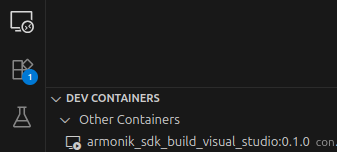
Note: As the project source is mounted in the docker, you may want to disable the file copies for
rsync.
1.3. How to build for Red Hat Enterprise Linux 8 / UBI 8
RHEL 8 ships without a system gRPC package. The recommended and tested approach is to use the pre-built static RPMs published at aneoconsulting/grpc-rpm. Because these libraries are compiled statically, some bundled dependencies (Abseil, Protobuf, c-ares) must also be linked statically into your binaries. ArmoniK.Api handles this automatically on Red Hat systems as of ArmoniK.Api v3.29.0 — consumer projects inherit the required static link flags through the CMake package config mechanism.
No RHEL subscription is required; all packages come from the UBI 8 base image and the EPEL repository, which are freely available.
1.3.1. 1. Enable EPEL and install system dependencies
rpm -ivh https://dl.fedoraproject.org/pub/epel/epel-release-latest-8.noarch.rpm

yum --disableplugin=subscription-manager install -y \
    make cmake git gcc gcc-c++ wget \
    libcurl-devel fmt-devel simdjson-devel re2-devel \
    zlib-devel openssl-devel
1.3.2. 2. Build and install nlohmann/json from source
nlohmann/json is not available as an EPEL package and must be compiled from source:
git clone --depth 1 https://github.com/nlohmann/json.git -b v3.11.3 /tmp/nlohmann-json
cmake -S /tmp/nlohmann-json -B /tmp/nlohmann-json/build \
    -DCMAKE_INSTALL_PREFIX=/usr/local \
    -DJSON_BuildTests=OFF
cmake --build /tmp/nlohmann-json/build --target install
1.3.3. 3. Install the gRPC RPMs
Download the grpc and grpc-devel packages from the grpc-rpm releases. The release tag appends an extra .x build counter to the gRPC version (e.g. 1.62.2.0 for gRPC 1.62.2, first build).
GRPC_BUILD=1.62.2.0           # check releases for the latest tag
GRPC_VER=${GRPC_BUILD%.*}     # strips the build counter → 1.62.2

wget "https://github.com/aneoconsulting/grpc-rpm/releases/download/${GRPC_BUILD}/grpc-${GRPC_VER}-1.el8.x86_64.rpm"
rpm -ivh "grpc-${GRPC_VER}-1.el8.x86_64.rpm"

wget "https://github.com/aneoconsulting/grpc-rpm/releases/download/${GRPC_BUILD}/grpc-devel-${GRPC_VER}-1.el8.x86_64.rpm"
rpm -ivh "grpc-devel-${GRPC_VER}-1.el8.x86_64.rpm"
The packages install under /usr/local/grpc; pass -DCMAKE_PREFIX_PATH=/usr/local/grpc to CMake so it can locate the gRPC config files.
Note: The RPMs bundle Abseil, Protobuf, and c-ares as static archives. Do not mix these with separately installed shared versions of those libraries.
1.3.4. 4. Install ArmoniK.Api
Download the RPM from ArmoniK.Api releases:
API_VERSION=<version>
wget "https://github.com/aneoconsulting/ArmoniK.Api/releases/download/${API_VERSION}/libarmonik-${API_VERSION}-Linux.rpm"
rpm -ivh "libarmonik-${API_VERSION}-Linux.rpm"
1.3.5. 5. Build the SDK
cmake -S /path/to/ArmoniK.Extensions.Cpp -B build \
    -DCMAKE_BUILD_TYPE=Release \
    -DCMAKE_PREFIX_PATH=/usr/local/grpc \
    -DARMONIK_API_DIR=/armonik/api \
    -DBUILD_CLIENT=OFF \
    -DBUILD_DYNAMICWORKER=ON \
    -DBUILD_END2END=OFF

cmake --build build -j$(nproc)
cmake --install build
The static gRPC RPMs are built with BUILD_SHARED_LIBS=OFF. ArmoniK.Api detects Red Hat at configure time and automatically links the required Abseil static libraries; no extra flags are needed in the SDK’s own CMakeLists.
1.4. Worker Docker images
Pre-built dynamic worker images are available on Docker Hub (dockerhubaneo/armonik-sdk-cpp-dynamicworker) for the following base platforms:
Tag suffix |
Base image |
Notes |
|---|---|---|
(none / default) |
Ubuntu |
General-purpose Linux |
|
RHEL 8 / UBI 8 |
For RHEL-based deployments |
The RHEL8 image installs nlohmann/json from source and obtains gRPC from pre-built RPM packages; no RHEL subscription is required for the UBI8 base layer.
1.5. How to build for Windows (Client only)
1.5.1. Prerequisites Windows
Visual Studio 2022 or CLion or any other IDE.
Git
1.5.2. Visual Studio
The Windows build is only for the client side, not the worker. When the prerequisites are satisfied, set up your IDE and configure it with CMake. You may check the installation directory of:
ArmoniK API
gRPC
Protobuf
CMake
If they are not installed in the same directory as specified in the CMakeLists.txt file at the project root, specify the install directory of ArmoniK API with ARMONIK_API_DIR and the others with CMAKE_PREFIX_PATH options.